

Mirror booth camera settings are essential to get sharp, bright and professional photos when using a magic mirror photobooth. Because of the one-way mirror, light is reduced, which means you must use manual settings to achieve the best results in any event environment. The question is posed for any operator of a Magic Mirror Photo Photobooth… How can I optimize my camera settings? How can I maintain optimal photo quality behind a one-way mirror? Of course, automatic mode is excluded from the outset… Make way for 100% manual settings! In this article, we will share our feedback, along with that of other users. You will find a series of tips on settings, illustrative photos, event videos, and video tutorials.
The Magic Mirror Photo Fotomax
Before getting to the heart of the matter, we will introduce the context and the various issues related to the Magic Mirror Photo and the use of a camera.
The place, the context:
Ideally, the location should be only slightly exposed to the sun, somewhat darkened, but without being too dark. The Magic Mirror photo booth should be positioned with its back to the sun’s rays.
Camera used:
We use two Canon cameras:
Canon 1300D EOS (Rebel T6) + 18-55mm IS II lens
Canon 500D + 18-55mm IS II lens
Additional equipment:
An external studio flash is essential. It must be placed at the top of your Magic Mirror structure (front-facing or rear-facing with a photo umbrella).
The use of external LED panels is strongly recommended to illuminate both the booth and the subjects being photographed. We use these LED panels mainly in dark environments. This helps us avoid autofocus issues such as “Autofocus not working”.
Best mirror booth camera settings for Canon:
The main idea is to work with a fairly high ISO, since the camera is located inside the Magic Mirror in a completely dark environment.
A short theoretical lesson: what is ISO in photography?
It is the sensitivity of the sensor to light. For the same aperture and shutter speed, a higher ISO sensitivity increases the exposure of the image. Remember, it was compared to skin type in the exposure article: a high ISO corresponds to sensitive skin (blond or red-haired), while a low ISO corresponds to darker skin.
Here you will find two very good lessons:
https://apprendre-la-photo.fr/video-la-sensibilite-iso-2/
http://objectif-photographe.fr/cours-photo-iso/
Let us return to the theoretical information given by Wikipedia:
In photography, ISO sensitivity measures the light sensitivity of film and digital sensors. It is an essential element in determining the correct exposure.
A photograph is correctly exposed when the sensitive surface receives the right amount of light: enough to produce an image that is neither too bright nor too dark. To obtain this correct exposure, the photographer must therefore know what the “right amount” is. ISO sensitivity is a way of expressing this information.
Then, depending on the location and the context, it will be necessary to test and adjust the shutter speed and aperture.
Here is our main setting:
Shutter speed: 1/60
Aperture: F10
ISO: 3200
90% of our events are configured with this manual setting on our Canon bodies, and problems are rare. Our photos are high quality and quite bright.

In January 2023, we carried out new tests. We now use the following configuration:

In November 2023, we had to work in a very dark, whitish environment with continuous white smoke. These settings enabled us to obtain both good previews and optimal photo quality:

One very important thing to remember: disable the camera’s auto sleep mode (Auto Off).

- Press Settings/Save.
- Press Preferences → Clock/Energy Settings → Auto Sleep Delay or Auto Off.
- Use the Up or Down arrows to choose the desired auto sleep delay, then press OK.
https://oip.manual.canon/USRMA-0016-zz-SS-frFR/contents/02110020.html
Our other settings used:
Depending on natural lighting conditions, we sometimes need to adjust our settings. Here is a series of settings that we have tested, used, and validated:
Shutter speed: 1/60
Aperture: F8
ISO: 6400
Shutter speed: 1/200
Aperture: F8
ISO: 1600
Shutter speed: 1/200
Aperture: F10
ISO: 3200
Shutter speed: 1/20
Aperture: F14
ISO: 3200
Shutter speed: 1/30
Aperture: F4.0
ISO: 1600
(Palais U Strasbourg, specific conditions: bright but with very high ceilings)
Shutter speed: 1/5
Aperture: F5.0
ISO: 1600
(Cour de Honau Strasbourg, specific conditions: very dark, no light, continuous white smoke projection)
Feedback from other Magic Mirror Photo users
FOTOMASTER
The company Fotomaster, which also specializes in this field, has issued recommendations for camera settings in this article.
Recommended camera settings
Hello everyone!
In this article, you will find our recommended settings for use with your Magic Photo Mirror.
The settings are:
Manual mode (M on the dial)
Shutter speed: 1/125
Aperture: F7.1
ISO: 400
White balance: Tungsten light
Image quality: S2
WB shift: A9, G9
The Community
In the community, we find various experiences. Here is one:
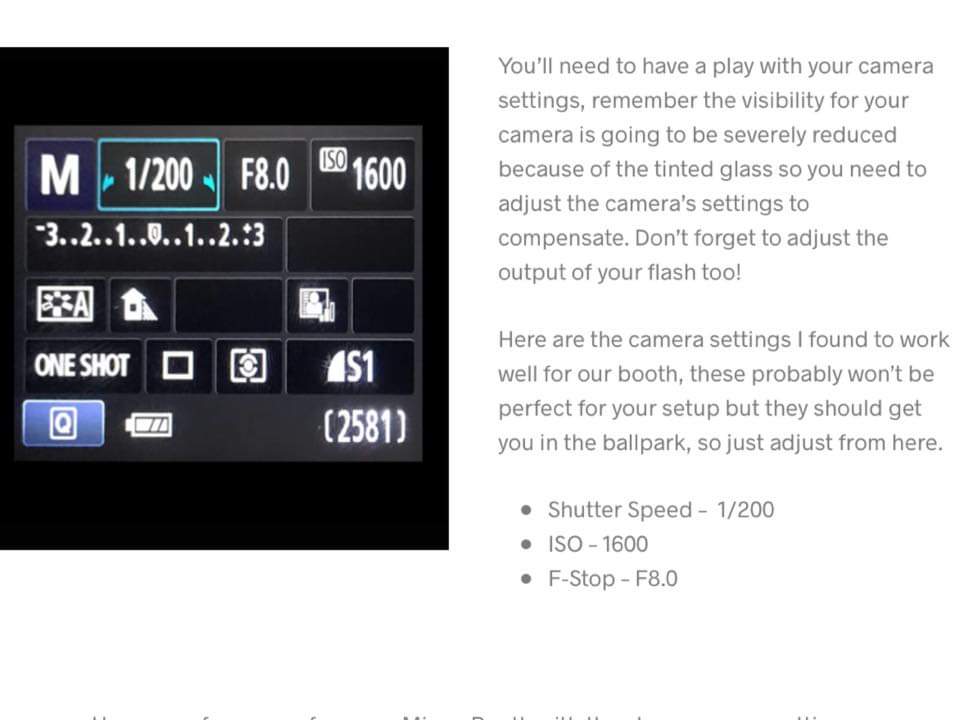
You will need to play with your camera settings. Remember that visibility for your camera is going to be severely reduced because of the tinted glass, so you need to adjust the camera settings to compensate. Do not forget to adjust the power of your flash too.
Here are the camera settings I found to work well for our booth. These probably won’t be perfect for your setup, but they should get you in the right range, so just adjust from there.
Shutter speed: 1/200
ISO: 1600
F-Stop: F8.0
Conclusion:
Now it is up to you to test and experiment. Feel free to share your feedback with us so that we can complete and update this article, since the suggested camera settings listed here are not exhaustive.
Remember that each Magic Mirror machine is unique, and each one-way mirror has its own properties and characteristics. This has a direct impact on photo quality and on your camera body settings.
These mirror booth camera settings will help you maintain consistent photo quality across all your events.
Every setup is different, so you should always adjust your mirror booth camera settings depending on lighting conditions.
Have fun 🙂
The Fotomax team, located in Strasbourg, France.
Michael & Mélaine
co*****@*****ax.fr
www.fotomax.fr
Summary of settings:
-
Settings Canon 1 -

Settings Canon 2 -

Settings Canon 3 -

Settings Canon 4 -

Settings Canon 5 -
Settings Canon 6